How Undervolting Your Whatsminer Firmware Can Cut Electricity Costs by 20%
If you run a Whatsminer ASIC, your electricity bill is probably the single biggest drag on your bottom line. You watch the kilowatt hours tick by, and every rate hike from your utility company stings a little more. There is a fix that doesn’t require buying new hardware or signing a hosting deal across the country. It lives inside your machine’s firmware. Adjusting the voltage your miner receives through custom firmware can drop your power consumption by 15 to 25 percent while keeping your hashrate surprisingly close to stock levels. That is real money every month.
Undervolting your Whatsminer through custom firmware is one of the most effective ways to reduce mining electricity costs without sacrificing meaningful hashrate. By lowering the voltage supplied to your ASIC chips while maintaining optimal frequency, you can cut power draw by 15 to 25 percent with only a 3 to 5 percent drop in performance. This guide walks you through the process step by step.
What Is Undervolting and Why It Matters for Your Whatsminer
Undervolting means telling your miner’s power regulators to send less voltage to the ASIC chips. Your Whatsminer leaves the factory tuned for stability across all conditions, which means the voltage is set a little higher than it really needs to be. That extra headroom costs you in wattage and heat. By trimming the voltage down to the actual operating threshold of your specific chips, you eliminate wasted energy.
Firmware is the only practical way to do this on a Whatsminer. The stock MicroBT interface offers basic frequency controls but does not give you direct voltage access. Third party firmware such as Vnish, Braiins OS, or custom ASIC tooling opens those hidden registers. Once you adjust voltage down, the miner draws fewer watts from the wall while still solving hashes at nearly the same rate. If you are curious about how different Whatsminer models stack up on efficiency after tuning, check out which Whatsminer model delivers the best hashrate per watt in 2026.
The chips inside your miner are not identical. Two M30S++ units from the same production batch can have slightly different voltage tolerances. That is why blanket settings from the factory leave performance on the table. Undervolting lets you find the individual sweet spot for each machine.
The Real Numbers Behind That 20% Electricity Savings
Let us talk about actual figures. A stock Whatsminer M30S++ runs at around 3400 watts and delivers about 112 terahashes. If you pay 10 cents per kilowatt hour, that machine costs roughly 8 cents per hour to run. Over a month, you spend about 58 dollars in electricity for one unit. Scale that to a farm of 50 machines and you are looking at nearly 90,000 dollars a year just in power.
A properly tuned undervolt profile can pull that wattage down to around 2700 to 2800 watts while losing only 3 to 5 terahashes. Your cost per hour drops to about 6.4 cents. That same 50 machine farm saves around 20,000 dollars annually. The savings get larger if your electricity rate is higher.
Here is a breakdown of what that looks in a simple table:
| Setting | Power Draw (W) | Hashrate (TH/s) | Efficiency (J/TH) | Monthly Cost (1 unit) |
|---|---|---|---|---|
| Stock | 3400 | 112 | 30.4 | 58.00 dollars |
| Mild undervolt | 3000 | 109 | 27.5 | 50.50 dollars |
| Aggressive undervolt | 2700 | 107 | 25.2 | 45.60 dollars |
The aggressive undervolt saves over 12 dollars per unit per month. For a 100 machine farm, that is more than 14,000 dollars a year. Those numbers make a strong argument for spending an afternoon flashing firmware.
Benefits Beyond Just Lower Power Bills
Saving on electricity is the headline, but undervolting your Whatsminer does more than shrink your monthly statement.
Heat output drops significantly. A miner running at 2700 watts produces about 20 percent less heat than one running at 3400 watts. That means your cooling fans do not have to work as hard, and your ambient room temperature stays lower. In a home mining setup, that difference can keep your garage or basement livable. In a larger facility, it reduces the load on your HVAC system and can extend the life of your cooling infrastructure.
Component longevity also improves. Heat is the number one killer of ASIC hardware. Running cooler reduces electromigration inside the chips and puts less stress on solder joints and power delivery components. A cooler miner tends to stay stable longer and require fewer repairs. If you want to keep your machines hashing for years, check out our guide on extending Whatsminer lifespan with real maintenance schedules.
Fan noise decreases too. When your miner produces less heat, the internal fans spin at lower RPMs to maintain target temperatures. That cuts down the high pitched whine that makes ASIC miners hard to live near. Your neighbors might not notice, but your ears definitely will.
Step-by-Step: Configuring Your Whatsminer Undervolt Firmware
The process for applying undervolt settings through custom firmware follows the same general flow across most third party tools. These steps assume you have already chosen a firmware option and are ready to flash.
-
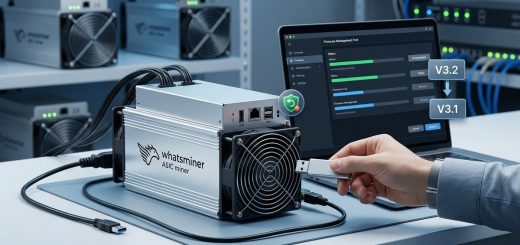
Back up your stock firmware. Before you change anything, save a copy of the original MicroBT firmware to your computer. If something goes wrong or you want to return to stock, you will need that file. Most custom firmware tools include a backup option in their interface.
-
Flash the custom firmware. Use the web interface or a dedicated flasher tool to load the new firmware onto your miner. This process takes about 10 minutes. Do not power off the miner during the flash. Wait for the interface to confirm the update is complete before touching anything.
-
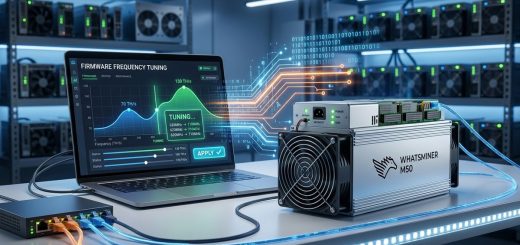
Access the advanced tuning panel. Once the custom firmware is running, log into your miner’s web dashboard. Look for a section labeled voltage, frequency, or tuning. This is where you will make your adjustments. Different firmware brands place this in different menus, but they all expose similar controls.
-
Lower the voltage in small steps. Start by reducing the voltage by 2 to 3 percent from the stock value. Apply the change and let the miner run for at least 30 minutes. Monitor the hashrate and check for hardware errors in the dashboard. If everything looks stable, lower it another 2 percent.
-
Watch for hardware errors. The miner’s dashboard will show a count of hardware errors on each hashboard. A small number is normal. If the error rate jumps above 1 percent or the hashrate drops significantly, you have gone too far. Bump the voltage back up one step and test again.
-
Lock in your stable settings. Once you find a voltage level that gives you good power savings without errors or hashrate loss, save that profile. Many custom firmware options let you create named profiles so you can switch between a high performance mode and an energy saving mode.
If you run into trouble during the flash or want a deeper walkthrough, read our guide on how to flash custom firmware on your Whatsminer without bricking it.
Common Mistakes That Kill Your Savings
Undervolting is not complicated, but a few common errors can waste your time or even damage your hardware. Here is what to avoid:
- Dropping voltage too fast. Large jumps can cause instant instability or crash your miner. Move in 2 percent increments.
- Ignoring ambient temperature. Hotter environments require slightly higher voltage to maintain stability. Tune your miner in the conditions where it will actually run.
- Forgetting to monitor after tuning. A profile that works in January might fail in July. Revisit your settings when seasons change.
- Using the same profile for every unit. Each miner has unique chip characteristics. Tune them individually for the best results.
The table below shows the most frequent mistakes and how to handle them:
| Mistake | Why It Hurts | Better Approach |
|---|---|---|
| Setting voltage too low | Causes hardware errors and lost shares | Reduce voltage in small steps and monitor errors |
| Skipping the burn in period | Hidden instability shows up hours later | Run for at least 4 hours before calling it stable |
| Tuning at the wrong temperature | Settings fail when ambient heat rises | Tune at your normal operating temperature |
| Copying settings from another miner | Chips vary between machines | Tune each unit individually |
Expert advice: “I have tuned over 200 Whatsminers for clients, and the biggest mistake I see is people trying to save time by applying one voltage to every machine. That approach leaves money on the table and risks instability on the units that need slightly more voltage. Spend the extra hour per machine. It pays for itself in a week.” — ASIC tuning specialist with 6 years of field experience
Making Undervolting Part of Your Long-Term Strategy
Undervolting should not be a one time project. Think of it as an ongoing optimization layer for your mining operation. As your hardware ages, the voltage requirements can shift. Chips degrade over time, and a profile that worked when your miner was new might need adjustment after 18 months of continuous operation. Revisit your settings every six months and after any major firmware update.
Pair undervolting with good maintenance practices for the best results. Keep your hashboards clean, replace thermal paste when you see temperature creeping up, and ensure your power supply is delivering clean power. Dirty power or failing PSU capacitors can mimic the symptoms of a bad undervolt setting. If your miner becomes unstable and you have not changed anything, check your power source before touching voltage again.
If you are running a mixed fleet of Antminers and Whatsminers, the tuning philosophy is the same, but the tools differ. Each brand requires its own firmware approach. For a direct comparison of how these two platforms handle tuning, read our Whatsminer vs Antminer S19 side-by-side comparison.
Your Next Move: Start Small and Scale
Pick one Whatsminer from your fleet. Flash custom firmware, run through the tuning steps, and let it run for a full week. Compare the power draw against a stock unit running beside it. The numbers will speak for themselves. Once you see the savings on that single machine, you will have the confidence to roll the process out across your entire operation. Undervolting is one of the few things in mining that gives you more money in your pocket for just a little bit of your time. Start with that one machine today.